

Rotogravure Printing Machine Manufacturer: 4, 6, 8 and 10 Colour
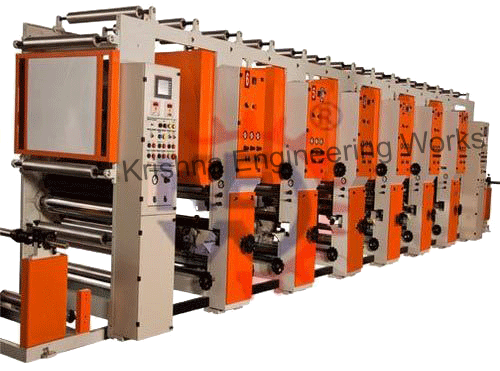
A rotogravure printing machine prints a continuous web from engraved cylinders, one cylinder for each colour, and dries every colour before the next one is laid on top. Krishna Engineering Works manufactures the rotogravure printing machine in 4, 6, 8 and 10 colour versions for polyester, nylon, BOPP, foil, LDPE, HDPE, polypropylene and paper.
The machines are built in Ahmedabad, India, to the customer’s technical requirements. This page explains the print station, the drying, the registration and the substrates, and lists what to send for a quotation.
How does a rotogravure printing machine work?
A rotogravure printing machine works by transferring ink from tiny cells engraved in a steel cylinder directly onto the web. The cylinder turns in an ink pan, a doctor blade wipes its surface clean, and a rubber impression roller presses the web against it so the ink left in the cells moves onto the web.
Because the image is in the cylinder itself, rotogravure repeats the same print with very little variation over long runs. Deeper cells carry more ink and print a darker tone. This gives smooth tonal work and dense solid colours, which is why the process is used for flexible packaging.
The web passes through the machine in this order.
- The unwind releases the web from the parent reel under controlled tension.
- A web guide brings the edge to a fixed line.
- An infeed section sets the tension for printing.
- The web runs through the print stations, one colour at a time.
- After each station the web passes through a drying chamber.
- An outfeed section isolates the print tension from the winding tension.
- The rewind builds the printed reel.
Colour configurations: 4, 6, 8 and 10 colour
Krishna Engineering Works builds the machine with 4, 6, 8 or 10 print stations. The number of stations is the first decision, because it fixes the length of the machine and the jobs it can run.
| Stations | General use | Points to consider |
| 4 colour | Process colour work, simple packs, line work with few spot colours | Shortest machine, lowest ink and cylinder stock |
| 6 colour | Process colours plus white and one brand colour | Covers a large share of film packaging jobs |
| 8 colour | Process colours, white, brand colours and a lacquer or a second white | The common choice for a converter with mixed work |
| 10 colour | Complex designs with several spot colours, coatings or registered effects | Longest machine, widest job range |
The uses in the table are general industry practice. Count the colours in your most demanding job, add white where you print on clear film, and add one more station if you want an inline lacquer or cold seal.
What is in a print station?
A print station holds everything needed to print one colour: the cylinder, the inking system, the doctor blade and the impression roller. Every station on the machine is the same, so an operator who can set one can set them all.
| Part | What it does | What to check |
| Engraved cylinder | Carries the image as cells that hold ink | Surface damage, correct seating at both ends |
| Ink pan and circulation | Keeps the cylinder supplied with ink of even viscosity | Viscosity, ink level, splashing at speed |
| Doctor blade | Wipes ink off the cylinder surface, leaving ink only in the cells | Blade angle, pressure, wear along the edge |
| Impression roller | Presses the web onto the cylinder | Rubber hardness, even pressure across the width |
| Dryer | Removes solvent before the next colour | Air temperature and air volume |
Oscillating doctor blade assembly
KEW fits an oscillating doctor blade assembly. The blade moves slowly from side to side as the cylinder turns, so it never bears on the same line of the cylinder for long. A blade that stays in one place wears a ring into the chrome surface and traps dirt that prints as a streak. Oscillation spreads the wear, which gives the printing cylinders a long life.
Impression roller
The impression roller is a rubber covered roll, chosen for the ink solvent and the web. Its hardness and its condition decide how completely the cells empty onto the web. The rollers are part of the rubber roller range, which the company produces in house.
Drying between colours
Each colour must be dry before the web reaches the next cylinder, or the wet ink is picked up and the print smears. The machine has drying chambers with energy efficient blowers after the print stations. Hot air is blown onto the printed side at high velocity, and the solvent laden air is exhausted.
Drying, not the print station, usually limits the speed of a gravure machine. Heavy solids, white backing layers and slow solvents all need more drying. As general practice, the air temperature is kept as low as the job allows on heat sensitive films, and air volume does more of the work.
When you enquire, state the ink system and the heaviest ink coverage you print. The dryers and their heating are sized from that.
Registration and web guiding
Registration is the placing of each colour exactly on the one before it. KEW equips the machine with a web guiding system and a registration system, and lists correct colour registration and smooth running at high speed among the results.
Three things keep colours in register.
- Constant tension. A film that stretches between stations prints long or short. Tension must stay steady from the unwind to the last station.
- A guided web. The web guiding system holds the edge on a fixed line, so side register does not drift as the reel runs down.
- Register correction. The registration system shifts each colour forward or back in the running direction until the register marks line up.
Thin, extensible films such as LDPE need the gentlest tension and the most careful drying, because heat and pull together change the print length.
Front and reverse printing
The machine prints on the front or on the reverse of the web. Reverse printing puts the image on the inner side of a clear film, mirror imaged, so it is read through the film. When that film is laminated to a second layer, the ink is sealed inside the laminate. It cannot be scuffed and does not touch the packed product.
Front, or surface, printing is used on paper, foil and opaque films, where the image must sit on the outside. A machine that does both can serve laminated pouches as well as surface printed wraps.
Substrates the machine prints
KEW designs the machine for polyester, nylon, BOPP, foil, LDPE, HDPE, polypropylene and paper. The table gives general notes on how each behaves on a gravure machine.
| Substrate | General behaviour | Typical product |
| Polyester (PET) | Stable under heat and tension, prints sharply | Laminated pouches, lidding |
| BOPP | Stable in the running direction, sensitive to high dryer heat | Snack packs, overwraps, labels |
| Nylon | Tough, absorbs moisture, needs care in storage | Vacuum and retort packs |
| LDPE and HDPE | Stretch easily, need low tension and cool drying | Bags, liners, milk and oil film |
| Polypropylene | Similar care to polyethylene when unoriented | Sealant layers, textile bags |
| Aluminium foil | Does not stretch, tears and creases easily | Pharmaceutical and confectionery foil |
| Paper | Absorbent, dusty, tolerant of heat | Wrappers, labels, cartons |
The applications KEW names for the machine are packaging films, paper printing such as labels and cartons, aluminium foil, laminated films and flexible packaging in general. Films must have a treated surface for the ink to key, so check the treatment level of the film you buy.
Combinations and the machines around it
A rotogravure line can be extended, and KEW builds two combined versions. The rotogravure machine with online lamination prints and laminates in one pass. The rotogravure or flexo unit on an extruder prints the film as it is made.
A printing department also needs machines after the press.
- A lamination machine to bond the printed film to its sealant layer.
- An inspection rewinding machine to check the print and remove faults.
- A slitter rewinder machine to cut the printed reel to pack width.
For shorter runs and simpler graphics, the flexo printing machine is the alternative, since its plates are quicker and cheaper to change than engraved cylinders. The group’s specialist site on rotogravure printing machines covers the process in more depth, and the whole catalogue is on the products page.
Common print faults and first checks
Most gravure faults come from ink viscosity, the doctor blade, drying or tension. The table lists general first checks.
| Fault on the print | Likely cause | First check |
| Fine streak in the running direction | Dirt or a nick under the doctor blade | Clean or change the blade, filter the ink |
| Haze or scumming in non image areas | Blade pressure or angle wrong, ink too thick | Blade setting, viscosity |
| Missing dots in light tones | Impression too low, ink drying in the cells | Impression pressure, solvent balance |
| Smearing or set off in the reel | Ink not dry at the next station or at the rewind | Dryer air, speed, solvent blend |
| Colours out of register | Tension changes, web stretching in the dryer | Tension settings, dryer temperature |
| Side register drifts | Web wandering | Web guide sensor and setting |
How the machine is specified
Krishna Engineering Works builds machines to the customer’s technical requirements, including non standard widths, speeds, substrates and automation levels. The specification is therefore agreed for each order, from the buyer’s jobs.
Customers are invited to the factory to take a trial of their machine before dispatch. The company also provides on-site installation and commissioning, operator training, spare parts and technical support, in India and abroad. For service on existing machines, see repairing and servicing.
What to send for a rotogravure printing machine quotation
Send the following, so the machine can be specified for your work:
- Number of colours: 4, 6, 8 or 10
- Substrates, with the thinnest and thickest gauge of each
- Maximum web width and maximum printing width
- Smallest and largest print repeat (cylinder circumference)
- Front printing, reverse printing or both
- Ink system and the heaviest ink coverage, including white
- Required production speed
- Parent reel and finished reel diameter, weight and core size
- Heating source available for the dryers
- Any inline process wanted, such as lamination
- Power supply at the site
Send these through the contact page.
Frequently Asked Questions
What is a rotogravure printing machine used for?
A rotogravure printing machine is used to print flexible packaging materials in long runs. It prints plastic films, laminates, aluminium foil and paper with consistent colour and fine tonal detail. Typical products are printed films for food and pharmaceutical packs, labels, wrappers and laminated pouches.
How many colours can a KEW rotogravure printing machine print?
Krishna Engineering Works builds the rotogravure printing machine in 4, 6, 8 and 10 colour versions. Each colour has its own print station and dryer. The number of stations is chosen from the most demanding job, counting the process colours, white, brand colours and any lacquer.
Which materials can be printed on the machine?
The machine is designed for polyester, nylon, BOPP, foil, LDPE, HDPE, polypropylene and paper. Stable films such as polyester print most easily. Extensible films such as LDPE need low tension and gentle drying. State every material and its gauge range in the enquiry, so the tension and drying systems suit them.
What does the oscillating doctor blade do?
The oscillating doctor blade wipes the ink from the surface of the cylinder while moving slowly from side to side. This movement stops the blade from wearing a ring into the cylinder and helps to clear dirt from under the blade edge. The result is fewer streaks and a longer life for the printing cylinders.
What is reverse printing in rotogravure?
Reverse printing is printing a mirror image on the inner side of a clear film, so the design is read through the film. After lamination the ink lies between two layers. It is protected from scuffing and kept away from the packed product. The KEW machine offers both front and reverse printing.
Is rotogravure or flexo better for my work?
Rotogravure is generally better for long runs, fine tonal work and repeat orders, because the engraved cylinder lasts and prints consistently. Flexo is generally better for shorter runs and frequent job changes, because plates cost less than cylinders. Many converters run both and choose the process for each job.
What details are needed to quote a rotogravure printing machine?
The main details are the number of colours, the substrates and their gauge range, the web width, the print repeat range, the ink system and the speed required. Reel sizes, the heating source for the dryers and the power supply at the site are also needed. The machine is then specified for those jobs.

